15 min read
Rendering Brilliance
A visual tour of the cubemap-based diamond shader — how a faceted gemstone becomes a single texture lookup, and what that gets you. Eight interactive figures, plain-English asides, and the optics that hold it all together.
On this page
Why is a diamond hard to draw?
Here is a question you have probably never asked. When you see a diamond on a website — turning slowly, sparkling, throwing little rainbow flashes — what is your computer actually doing?
If you have a photograph, the answer is simple: it is just showing the photograph. But if it is a real-time 3D model that you can rotate, zoom, and reconfigure, something much harder is happening. Several million times per second, your phone is being asked to simulate light — to figure out, for every pixel on the screen, what color it should be, based on a hypothetical light bouncing through a hypothetical stone.
This article is about how that actually works. It assumes you are curious but not necessarily technical. Every section starts with a plain-English explanation; the math and the diagrams come after, for the readers who want them. You can skim the friendly parts and skip the equations, or do the opposite — both will get you to the end.
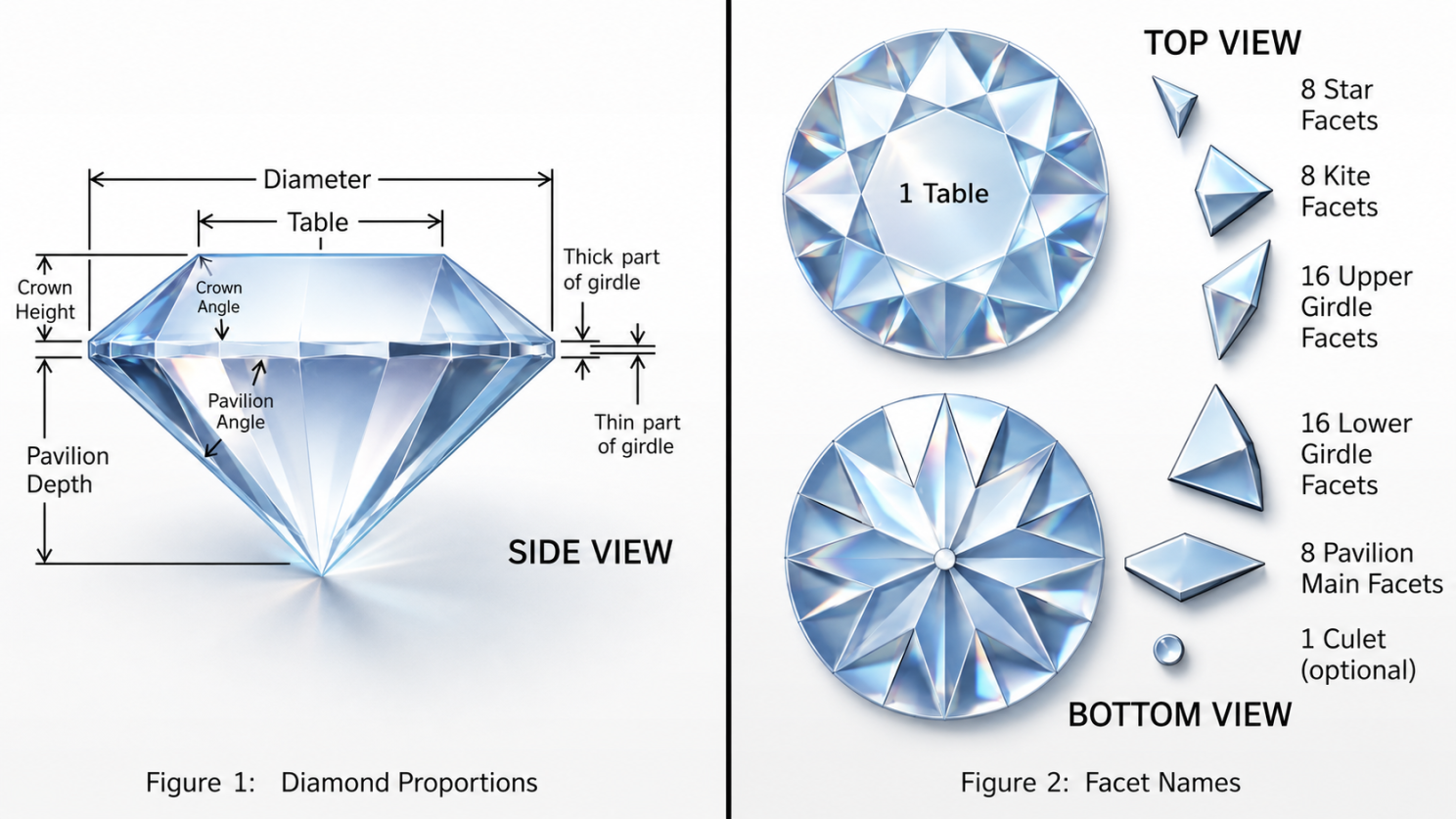
A round brilliant cut diamond, side view, with the names cutters give to each facet. The arrangement is not aesthetic — it is mathematically optimized to bounce light back toward the viewer.
A diamond is not really one shape. It is fifty-eight tiny mirrors glued together at very specific angles. When light goes in, it does not just pass through — it ricochets off the inner walls, sometimes four or five times, before finding its way out. That ricocheting is what makes a diamond sparkle.
To draw a diamond on a screen, a computer has to play this game of pinball for every single pixel. And there are roughly two million pixels in a phone screen. That is a lot of pinball.
The honest engineering answer is that simulating light correctly, in real time, at the resolution of a modern phone screen, is not yet possible. The clever engineering answer is that we don't have to. We can cheat, in a very specific way that the human eye won't notice, and the result is what you see when you spin a stone around on a jewelry website.
This article is the story of one such cheat. We will build up to it slowly.
§ 1 — You can't ray-trace a diamond on a phone
Pretend you are a single ray of light. You enter a diamond from above. The first thing that happens is you bend — like a straw in a glass of water, only sharper. Then you hit the back wall of the stone, but instead of going through, you bounce. You hit another wall. Bounce. Another. Bounce. Eventually you escape out one of the top facets and head toward someone's eye, where you become a tiny flash of brilliance.
Drawing a single picture of a diamond means doing this — playing the entire pinball game — for every pixel on the screen, all sixty times per second. The number of bounces adds up fast.
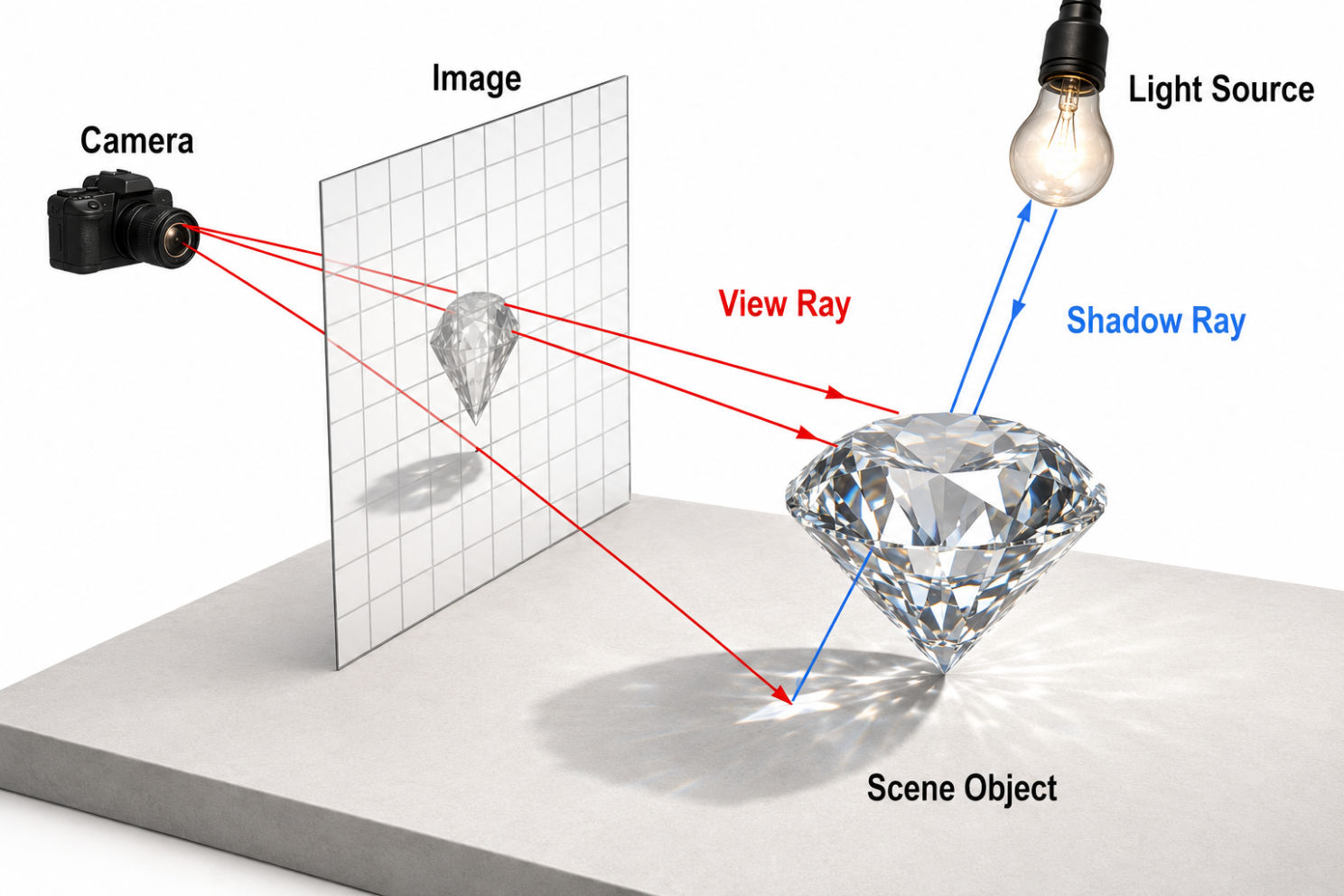
The textbook picture of ray tracing. For each pixel, a ray is cast into the scene. When it hits something, it spawns more rays: one toward each light, one for the reflection, one for the refraction. Each of those may spawn more. The tree branches.
A round brilliant has 57 to 58 facets. Diamond's refractive index is 2.417, so its critical angle is about 24°: most rays bounce around inside the stone five or six times before escaping. A faithful renderer follows every one of those bounces against the mesh.
The arithmetic is unforgiving. At 1080p, with a simple BVH, a single frame is on the order of 10⁸ ray–triangle tests. On a phone GPU, this is a non-starter.
So we make an exchange. We give up the exact mesh, and we keep what actually matters to the eye: the sharp facet boundaries, the rainbow flashes, the deep internal glow. The trick is finding a cheaper representation that captures the same first-order optics.
§ 2 — A cut gemstone is a star
Stand inside a small dome. Look in any direction. You see the dome.
Now stand inside a maze. Look in any direction. You might see a wall, or you might see the wall behind a wall, or three walls stacked up. The first situation is simple. The second is complicated. A diamond, from its own center, is more like the dome.
This sounds obvious, but it has a startling consequence. If every direction from the center of a gem points to exactly one spot on the surface, then we can describe the entire shape of the gem with a single recipe: "for each direction in the world, here is the surface point and which way the wall faces." That recipe is a tiny piece of data the computer can look up. No more pinball.
Here is the small, almost-embarrassing fact that unlocks everything. A polished gemstone is star-shaped with respect to a point near its center: from that point, every ray to the surface hits the surface at exactly one place. No facet hides behind another.
This is not an accident. It is what cutters do for a living. A gem that violates star-shapedness from its optical center can't sparkle — light from outside would never reach the hidden facets in the first place.
The consequence is that the entire surface — its shape and its facet orientation — can be described by a function on the unit sphere. Direction in, surface point and normal out. That is precisely what a cubemap is.
The mesh becomes a texture. Six images on the faces of a cube, indexed by direction, replace tens of thousands of triangles and the BVH that searches them.
§ 3 — Unrolling a gem onto a sphere
Imagine a tiny photographer standing at the dead center of the diamond, holding a camera that can shoot in every direction at once. They take a 360° photograph — but instead of capturing color, the photograph records the shape of what they're looking at. For every direction, the photograph remembers two things: how the wall is angled, and how far away it is.
This photograph is the cheat. We take it once, before anyone is watching, and save it as a tiny file. From then on, anytime the computer needs to know what's at some direction inside the diamond, it just looks at the photograph. No geometry. No search. One lookup.
Graphics people call this photograph a cubemap, because it lives on the six faces of an imaginary cube wrapped around the photographer.
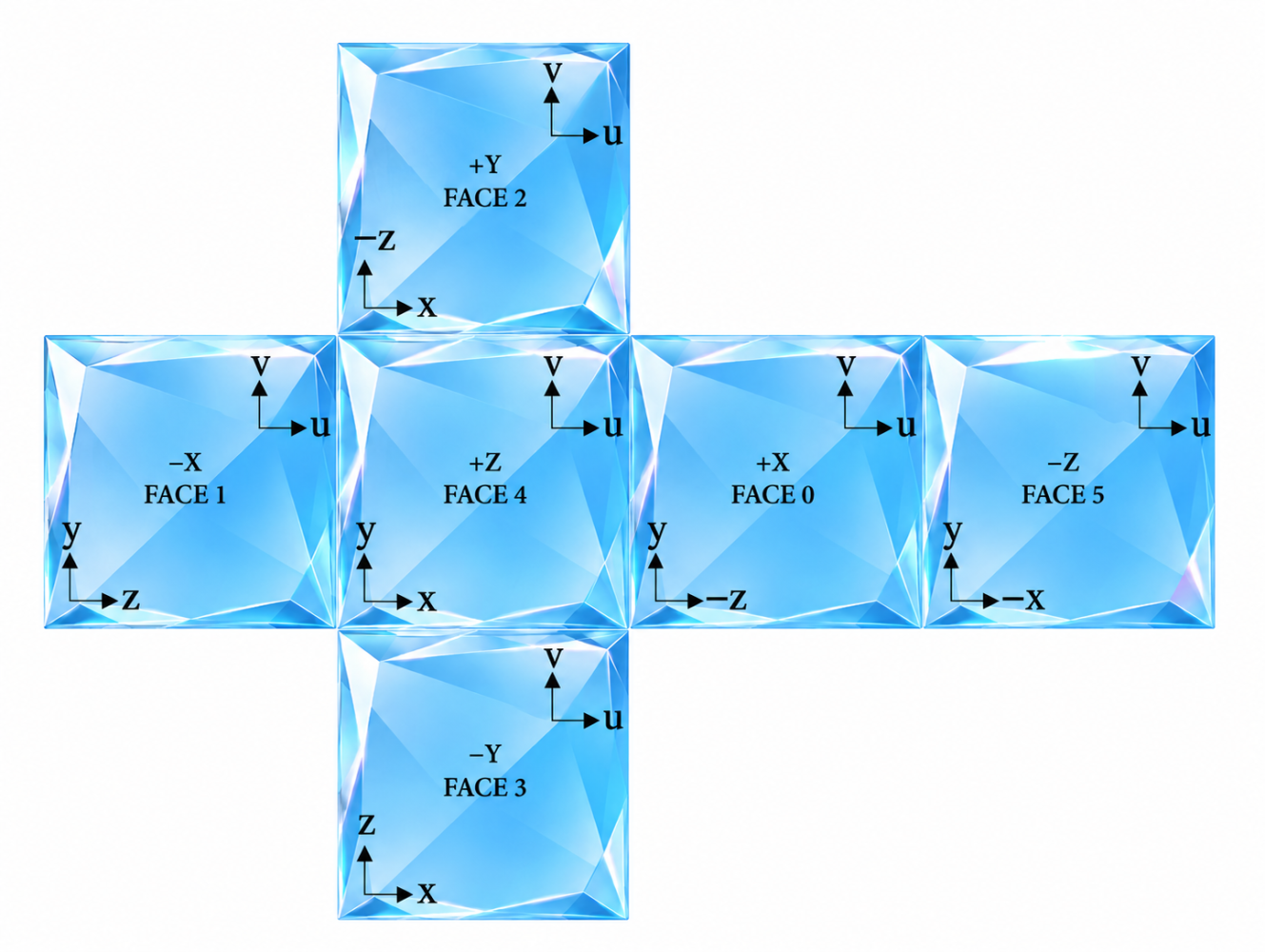
A cube map. Six square images wrapped around the photographer, one per direction (left, right, up, down, front, back). Any direction in 3D space hits exactly one pixel on one face — a single, cheap lookup.
Once a day, offline, we look at the gem from its center in every direction and remember two things: which way the surface is facing (the normal) and how far away it is (the radius). The first lives in the RGB channels, the second in alpha. We do this once. We never touch the mesh again.
Two details matter. Precision. Eight bits per channel quantizes the distance into 256 buckets, which collapses adjacent rays onto the same flat plane and renders the gem as if it were carved out of plastic. A half-float target removes the steps.
Hard normals. Most exported meshes ship with averaged smooth normals — sampling those gives you something that looks like wet glass instead of a diamond. We rebuild the mesh as per-face geometry first, so every triangle carries the flat facet normal and the bake reads back as a piecewise constant function on the sphere.
§ 4 — From a bounding shell to the surface, in two steps
Here is a small puzzle. The photograph from the last section is keyed by direction — you tell it which way you're looking, and it tells you what's there. But when a ray is bouncing around inside the diamond, what we actually want to know is where it will hit the wall next. That's a slightly different question.
The trick is to guess, look up, and refine. We start with a rough guess — pretend the gem is a smooth egg shape, intersect the ray with that egg, and read the photograph at the egg-hit's direction. The photograph tells us where the real facet actually is. We re-intersect with that facet. Then we do it once more, just to be sure. Two lookups, no search.
It is a bit like asking for directions twice. The first answer gets you close. The second confirms it.
At render time, every ray inside the gem needs to know where it will exit. We have no mesh to search. We have a texture. Here is how a single ray finds the surface.
First, we intersect the ray with the gem's bounding ellipsoid — a cheap closed-form. This gives a hit point in the right neighborhood, but on the wrong surface. Then we use the direction from the optical center to that hit to read the texture, which tells us the real surface point and the local facet normal. The ray gets re-intersected with that plane. We repeat once.
Two iterations of this are enough. Conceptually it is Newton's method on an implicit surface, where the texture gives us the tangent plane at each estimate.
§ 5 — Diamond does not have one index of refraction
You have probably seen a prism throw a rainbow on a wall. The reason it does this is that white light isn't really one color — it's all the colors stacked on top of each other. When it goes through glass, each color bends by a slightly different amount. The red bends a little. The blue bends more. By the time the light comes out the other side, the colors have separated.
A diamond is, optically, an exceptionally aggressive prism. Every facet inside the stone bends each color a different amount, and the light bounces between facets several times. The result is little rainbow flashes that escape from the surface — what gemologists call fire.
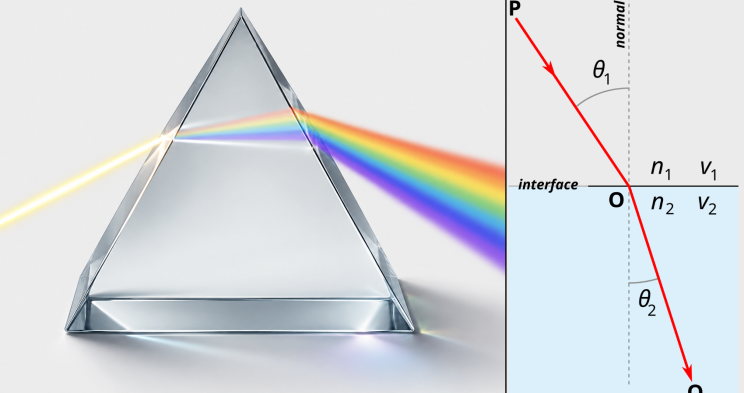
Left, a prism — white light in, rainbow out, each wavelength bending by a slightly different angle. Right, Snell's law — the rule that decides how much a ray bends at every transparent boundary. The bigger the index difference, the sharper the kink.
Snell's law is taught with a single number for the medium. Real materials disperse — the index depends on wavelength. Cauchy's 1836 formula approximates it as a series in 1/λ². For diamond, the index is about 2.402 at the red end and 2.465 at the violet end. The difference is small. The consequence is the rainbow flashes that gemologists call fire.
We do not render the full spectrum. We render three samples — one each for the R, G, and B channels — and let the three refracted rays fan out, picking up the environment from slightly different directions. The result is the optical signature of dispersion at the cost of three texture samples instead of one.
§ 6 — Why a sapphire is blue, in one equation
Pour a glass of beer. Look through the top of it — pale. Look through the side — deeper amber. Look through a tall pint glass from the bottom up — almost black. Same beer. The difference is how much of it the light had to travel through on its way to your eye.
This is how a colored gemstone gets its color. White light goes in. The material is just slightly tinted — say, a hint of blue. A short trip takes a small bite out of the red and green parts of the light, and what comes out the other side is still pretty white. A long trip — say, several internal bounces — chews away almost all the red and green, and what comes out is a deep, saturated blue. The longer the path, the deeper the color.
This is true for sapphire, ruby, emerald, amber — every colored stone. They are all white light minus what the material absorbed along the way.
Light traveling through a colored material loses energy along the way. The amount lost depends exponentially on the distance traveled — the Beer–Lambert law. A short trip through a sapphire takes a tiny bite out of the red and green channels. A long trip eats almost all of them, and what comes out the other side is blue.
§ 7 — Every refraction is also a reflection
Stand by a lake. Look straight down. You see the bottom — light is going through the water and back to your eyes. Now look across the lake, almost level with the surface. You don't see the bottom anymore. You see the sky reflected on top of the water. The water hasn't changed. The angle you're looking at it has.
This happens at every transparent boundary, all the time. When light hits the surface of a diamond — going in or coming out — some of it goes through, and some of it bounces off. The proportion depends on the angle. At a steep angle, most goes through. At a shallow, grazing angle, most reflects. The bright rim of every gemstone is this effect.
When light hits the boundary between two media, it does not all bend through. Some bounces off. The fraction that reflects depends on the angle of incidence and the index contrast — at glancing angles, nearly all of it reflects regardless of material; at perpendicular incidence, only a small fraction. The curve has a name: Fresnel.
Schlick's 1994 approximation reduces the full Fresnel equations to a single tidy polynomial, which is what every real-time renderer uses. For diamond, the perpendicular reflectance — the value at the bottom of the curve — is about 17%.
§ 8 — One ray, the whole stack
An orchestra is a strange thing. A violin alone is pretty. A flute alone is pretty. But a symphony is something else entirely — not a stack of pretty noises, but a single piece of music that only exists when everything plays at once.
The same is true here. We've gone through the parts: the shape, the photograph, the bending of light, the dispersion into rainbows, the absorption of color, the reflection at the surface. None of those alone is a diamond. A diamond is what happens when all of them run simultaneously, on thousands of rays, every single frame.
The animation below is what that looks like — not a real renderer, but a representation of the same dance, in two dimensions.
Now everything composes. A ray enters the stone, splits off a Fresnel reflection at the boundary, refracts inward as three slightly diverging wavelengths, intersects a facet via the texture lookup, attenuates by Beer–Lambert along the segment, splits again, and continues — up to five bounces before what is left has too little energy to care about.
The animation below is a representation, not a renderer. It traces fans of rays through a 2D analogue of a gem, layering in each effect as it goes. Watch how much of the fire happens after the third bounce.
§ 9 — The data structure was the breakthrough
The math wasn't new. Snell, Beer, Fresnel, Cauchy, Schlick — every piece of optics here is a century old or more, except the last one which is thirty.
The conceptual move was small and specific. We stopped asking "where does this ray hit the mesh" and started asking "what is the unique surface point visible along this direction from the optical center." The first question requires a search tree. The second is a function on the sphere, because the gem is star-shaped, and a function on the sphere is a cubemap.
Everything else is classical optics applied on top of that substitution. The lesson generalizes — the trick of replacing geometric search with a directional lookup table works on any star-shaped solid, and most polished things in the world are.
Selected reading
- Whitted, T. (1980). An Improved Illumination Model for Shaded Display. Communications of the ACM, 23(6) — the original recursive ray-tracing paper.
- Schlick, C. (1994). An Inexpensive BRDF Model for Physically-based Rendering. Computer Graphics Forum, 13(3) — the Fresnel approximation used in § 7.
- Karis, B. (2013). Real Shading in Unreal Engine 4. SIGGRAPH 2013 Course — the split-sum environment integration the § 7 demo collapses to.
- Walter, B. et al. (2007). Microfacet Models for Refraction through Rough Surfaces. EGSR 2007.
- Wilkie, A. et al. (2014). Hero Wavelength Spectral Sampling. Computer Graphics Forum, 33(4) — the spectral sampling philosophy behind the RGB-channel dispersion in § 5.
- Cauchy, A. L. (1836). Mémoire sur la dispersion de la lumière. Prague — the original wavelength-dependent IOR series.
- Tilton, G. (1985). The Geometry of Faceting. — why cutters care that gems are star-shaped from their optical center.
All interactive figures in this article are original work, written from scratch as schematic 2D representations. They are designed to convey the underlying ideas — they are not the production renderer. The reference images were AI-composed from public-domain optics diagrams on Wikimedia Commons.
Comments
Tags in this post
Keep reading
Building a 3D ring configurator in Expo
The complete story of Lumière: loading GLBs on device, composing rings from parts at runtime, a custom refractive gem shader, porting the whole thing to the browser — and the audit that found a stranger's email address inside a binary before I made it public.
17 min · May 5, 2026
Carnegie Hall, rebuilt from a seating chart
How I turned a flat ticketing map into a complete Stern Auditorium: 2,758 seats, four tiers of gilded parapets, vaulted ceilings and hundreds of real light fixtures. I did it by building tools instead of sculpting.
33 min · Sep 16, 2026
A design file you can diff is harder than it sounds
Why readable FNX was not enough: Fanta's 25,311-line diff, overwritten source edits, and the move to project files as the authority.
6 min · Sep 30, 2026
All tags
- #ai
- #blender
- #build-in-public
- #cubemap
- #design-tools
- #diamond
- #environment-art
- #expo
- #fanta
- #file-formats
- #git
- #graphics
- #houdini
- #huggingface
- #image-generation
- #licensing
- #macos
- #mdx
- #meta
- #next.js
- #ocr
- #onnx
- #open-source
- #performance
- #procedural
- #python
- #r3f
- #ray-tracing
- #react-native
- #rendering
- #replicate
- #revenuecat
- #rust
- #sam2
- #segmentation
- #shaders
- #shipaton
- #technical-art
- #three.js
- #vercel
- #wasm
- #web-worker
- #webgl
- #webgpu