Introducing
Areuin.com Landing Page
Areuin is a digital sports betting product with Freeplay and Real Money play modality, with an innovative, fun, and social game scheme in which, unlike the competition, the player always benefits since he does not play against the house but against a group of friends or a local clan.
Areuin was one of my biggest challenges, its infrastructure was quite complex and sophisticated, as a full-stack developer I played various roles in the company, from front-end developer, UI / UX designer, to backend and DevOps.
Although I had been working at Areuin for a considerable time building advanced features oriented to Backend and DevOps such as Service Mesh, API Gateway, and Auth Service, which were a milestone in my career, it should denote that the Landing page is my greatest success, not only for its aesthetics but for the amount of detail that took its elaboration; Since along the way I even had to create a feature robust enough to be a library, this feature is a polygon packed sprite rendering engine custom made for Areuin sprites but flexible enough to use in any project.

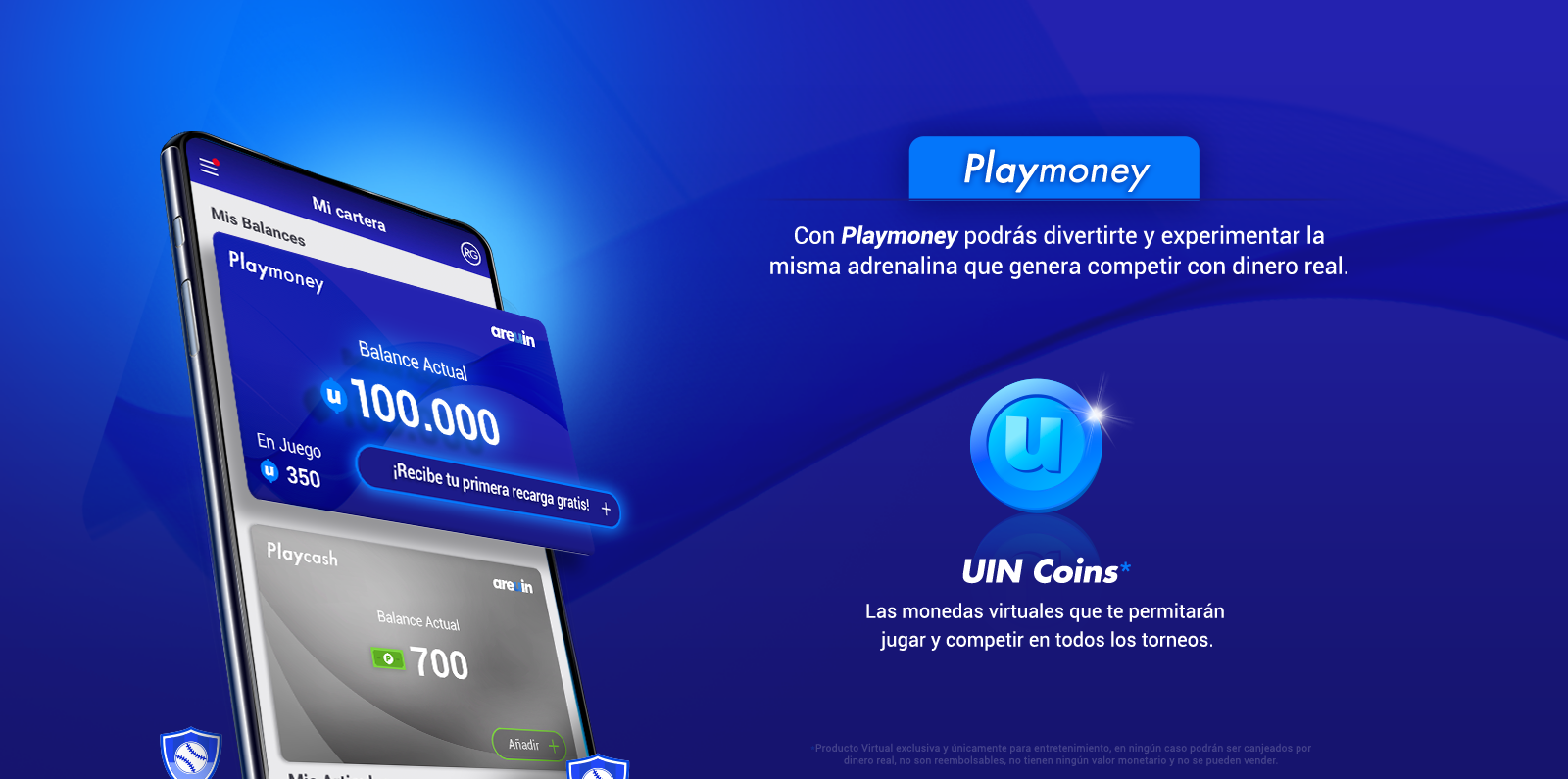






Initially, a design was proposed to me by theheladeria.com, the concept was fresh, attractive, and had an exquisite color palette as well as a magnificent composition of elements, which fits the brand like a glove.
Thanks to my skills and knowledge of React, Gatsby, and the DOM, I was able to execute an MVP in less than 3 days, I translated the initial design from PSD to basic react.
However, I am not the typical developer who feels comfortable completing tasks without getting involved, since I usually involve as much as the CEO in the products I work on, so I spoke directly with the CEO and the creative consultant of the company to raise that designed together to new heights; comparing with giants like Apple, the CEO was somewhat skeptical at first, but due to my previous work for the company, he decided to give me a vote of confidence and hand in hand with Andres Fuentes (Creative Consultant and Co-founder) I gave more interactivity to the site, I made some decisions and I remade some sections, in addition to adding others, I completely reimagine the website adding 3d animations with after effects and element3d, also I translated the website to English and made an SEO router in order to bring /en pages for English and / for Spanish, all created automatically from Firestore documents during build time.
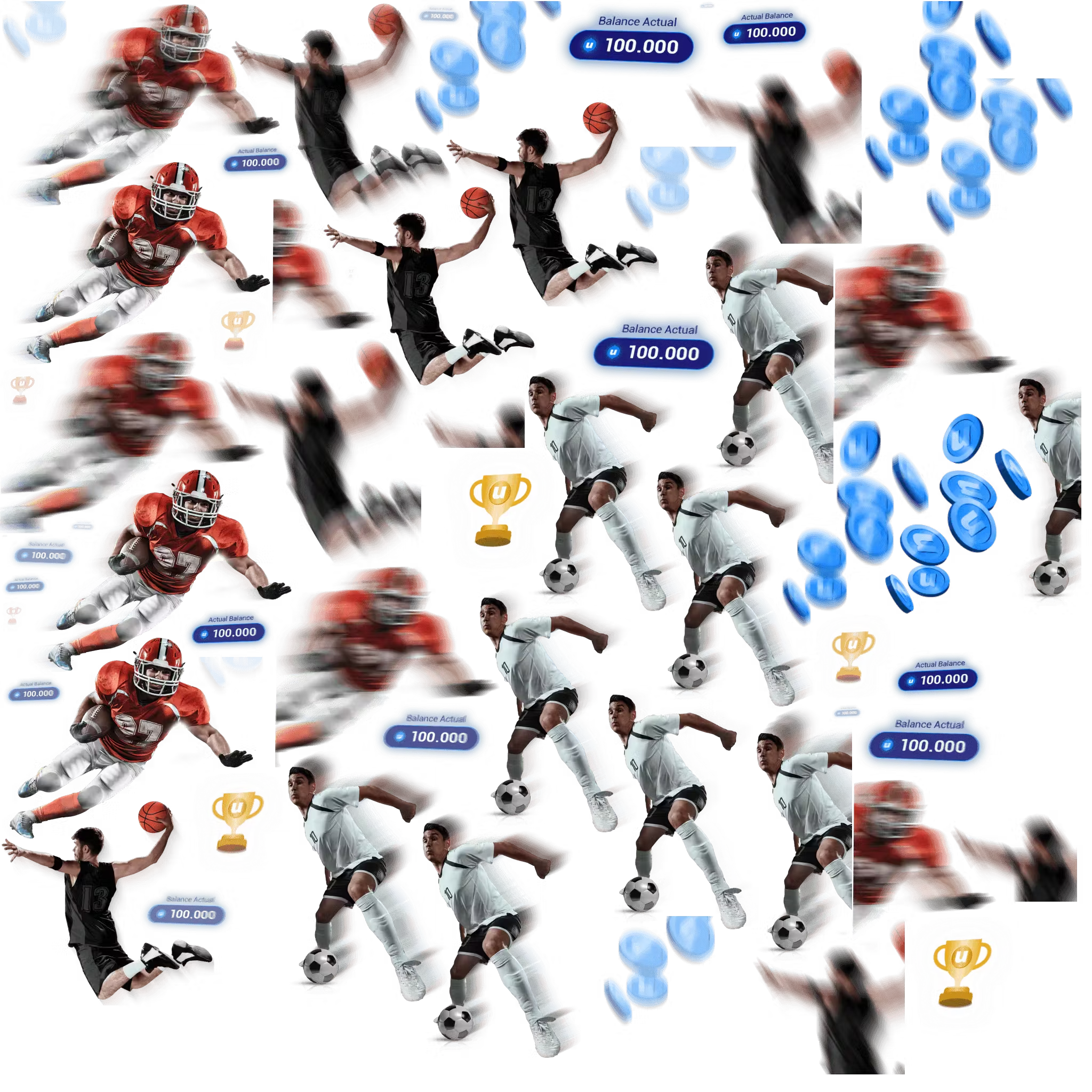
Players sprite
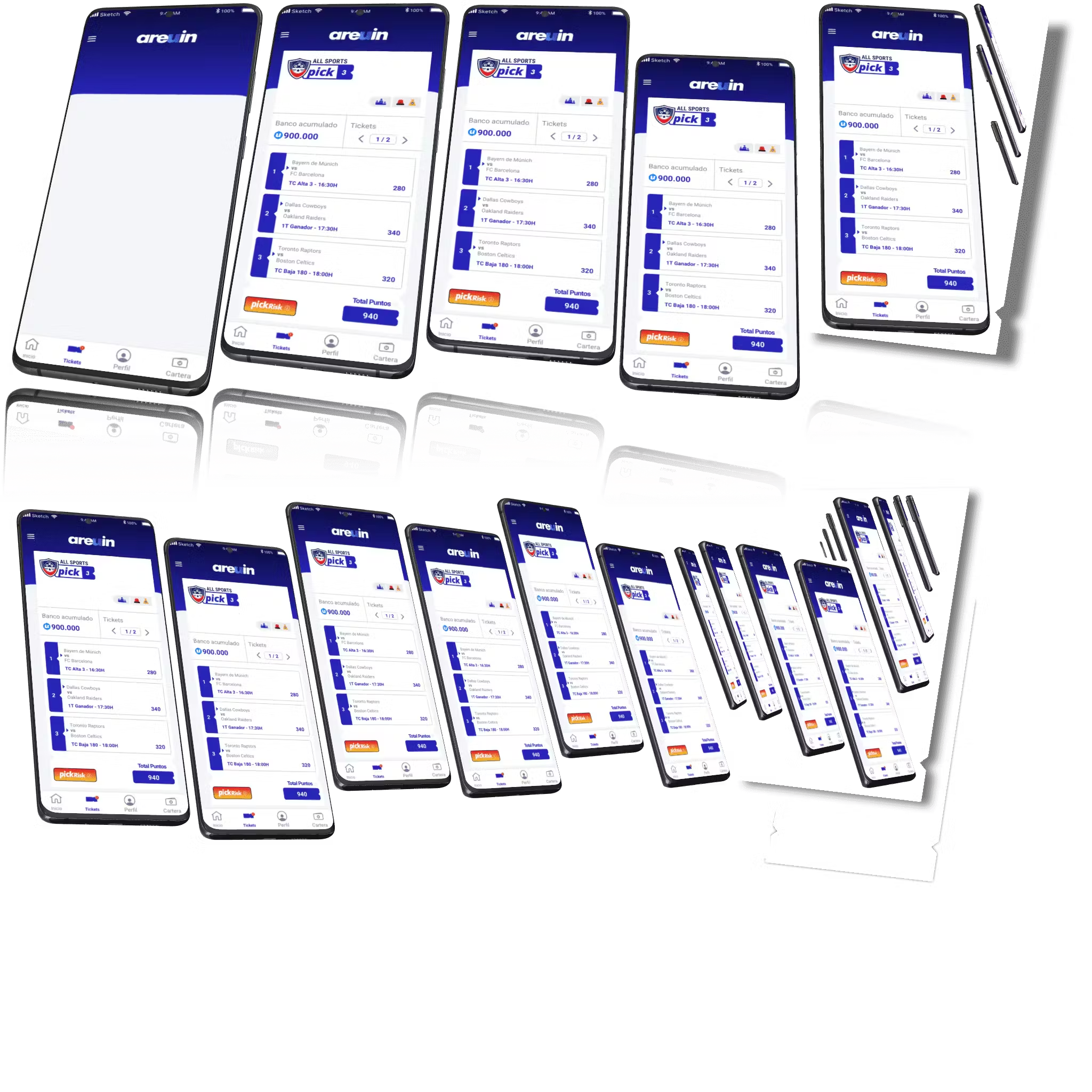
Phone sprite
The work done by Jean left us impressed, his technique with after effects and video editing combined with his mastery of browser APIs resulted in a product that stands out from the vast majority for its elegance, its speed, and above all its interactivity.
Herbert Corona, Areuin CEO
From After Effects to a JSON atlas
The hero never touches a 3D engine at runtime. What you see is a 2D canvas pulling pre-baked pixels out of an atlas — but those pixels start their life in After Effects, in front of a 3D model of a phone.
1. The shot, in After Effects
I built the unfolding sequence as a single AE comp: a 3D phone model rotating into frame, the actual Areuin app screens composited inside the screen layer of the phone, motion blur tracking the camera, a subtle bloom on the highlights, and the supporting assets — soccer ball, basketball, trophy, balance, coin pile — popping into the scene on their own staggered timing. Everything that needed to feel 3D was rendered in AE's 3D space against transparent backgrounds; the engine itself stays flat.
2. Split the video into keyframes
The render output is a PNG sequence — one frame per keyframe of the final animation. I picked roughly 80 keyframes for the full scroll, more densely packed near transitions where the phone unfolds quickly, sparser on the holds. Each keyframe is exported on its own transparent background, with each independent element (phone, ball, ticket, shadow) on its own PNG so they can be re-composited and re-timed at runtime instead of being baked into a single flat layer.
3. Pack with TexturePacker
That folder of per-element PNGs goes into
TexturePacker
with the "polygon packing" option enabled. Polygon packing is the trick that makes the runtime cheap: instead of bounding each transparent PNG with a rectangle (which wastes pixels on the empty corners), TexturePacker traces a tight polygon around the visible silhouette of each sprite, triangulates it, and arranges the polygons like Tetris pieces into a single atlas. The output is two files:
An atlas PNG — every sprite frame baked into one image, packed as tightly as the polygon shapes will allow. Phones go in one atlas, sports assets in another; the engine treats them as separate texture units.
A JSON descriptor — for each frame, the atlas
framerect, the destinationspriteSourceSizethe sprite would have on a flat canvas, itsvertices+trianglesarrays for the clip path, and the per-frametransformsif it needs to scale or skew at runtime. This is exactly the shape the engine consumes — no conversion step in between.
What the atlases actually look like
sprite-1— the phone unfoldEvery keyframe of the phone tilting in, plus the three shadow poses, all baked into one 2048×2048 atlas. The triangulated cutouts let each frame share whitespace with its neighbours instead of fighting them for rectangular real estate.
sprite-3— the supporting assetsFootball tackle, soccer kick, basketball dunk, trophy and coin pile, the balance scale — each with its own keyframe sequence, packed into a second atlas so the phone scene and the assets scene can be invalidated independently.
The runtime never knows there used to be a 3D phone, motion blur, or a glow. It just reads a JSON file and stamps the right pixels at the right place for whatever scroll position it's looking at. Everything expensive happened in After Effects, on my machine, once.
A rendering engine, in 90 lines
Libraries like Konva or CreateJS sit a couple of abstractions away from the canvas — scene graphs, event systems, retained-mode rendering. Areuin's hero needed exactly one thing: take a triangulated sprite, clip it to a polygon, and stamp it onto a 2D context at a transform driven by scroll. The whole engine, ported almost line for line to TypeScript for this page, is small enough to read in one sitting.
class RenderEngine {
init(canvas) { /* load sprite atlases via new Image() */ }

draw(keyframe) {
  canvas.width = meta.size.w; canvas.height = meta.size.h
  sprites.animations.forEach(a => this.getSceneFrame(a, keyframe))
}

drawScene({ image, frame, spriteSourceSize, vertices, triangles, transforms }) {
  ctx.restore()
  ctx.setTransform(scaleX, skewY, skewX, scaleY, distanceX, distanceY)
  ctx.save()

  if (vertices) {
    ctx.beginPath()
    triangles.forEach(t => {
      ctx.moveTo(vertices[t[0]][0], vertices[t[0]][1])
      ctx.lineTo(vertices[t[1]][0], vertices[t[1]][1])
      ctx.lineTo(vertices[t[2]][0], vertices[t[2]][1])
    })
    ctx.closePath(); ctx.clip()
  }
  ctx.drawImage(image, frame.x, frame.y, frame.w, frame.h,
                spriteSourceSize.x, spriteSourceSize.y,
                spriteSourceSize.w, spriteSourceSize.h)
}
}
Polygon packing
TexturePacker can pack rectangles. The expensive pixels in a phone
screenshot — corners, transparent halos, drop shadows — burn rectangle
space that nothing draws into. Polygonal packing fits each sprite to a
tight triangle fan, so the atlas is roughly 30% smaller per asset. Few
commercial 2D engines support it; the only mainstream one I know that
does is Unity. The Areuin engine reads vertices and
triangles straight out of the atlas JSON and feeds them to
ctx.clip(), so each drawImage sees only the
triangulated silhouette.
Multipack animations
Each animation is a list of keyframes, each keyframe carrying its own frame rect, its own polygon, and its own affine transform. That last bit is what makes the engine feel like a tween library without being one — the phone scene above unfolds across roughly 25 frames, and every frame is a different image region clipped to a different polygon at a different scale. The atlas holds all the intermediate poses; the engine just looks up the one for the current keyframe and stamps it.
Scroll as the clock
Drawing 60 fps of recursive ray tracing is hard. Drawing one frame per
scroll position is trivial — and it's what makes the hero feel like
Apple's iPhone SE page. The scene timeline runs 0 → 80; the
page's sticky outer wrapper is 200 vh tall, the inner is pinned at
the top, and the engine reads scroll / total as
its clock. No requestAnimationFrame loop, no easing curves, no
spring physics. You stop scrolling, the engine stops drawing.
Stacked canvases
The light-flash overlay that makes the assets twinkle is a second canvas sitting on top of the first, driven by a separate scene at its own cadence. Two engines, two atlases, one composited frame. Because each canvas is independent and the engine is stateless beyond its image cache, scaling to more layers is purely an HTML-and-DOM exercise — the engine itself doesn't care.
Demo · Rendering engine output
Areuin
Sports betting reimagined as a social game. Play against your friends or your clan — not against the house. Freeplay and real-money modes in one app.
Available on iOS and Android.
Rendering engine, recap: hand-rolled polygon-packed sprite renderer, scroll-driven keyframe lookup, triangulated clipping mask, multi-canvas compositing — all on top of
ctx.drawImageandctx.setTransform.Create a library of custom icons: icon libraries such as font awesome and material, promotes bad development since by using CSS they cannot take advantage of the three shaking feature of Webpack, therefore they must be later purged with Purgecss, which is dangerous, for this, using Icomoon and illustrator, I created an SVG icon pack myself that was implemented as a font, in the same way as font-awesome does, but only with Areuin's exclusive icons
Set Up Firebase in production environment:
Initially, it was proposed that the landing page was a static site in Netlify, but due to the characteristics of firebase, I decided to create a template engine, in which there is only a single template and different languages can be added, Pages and components using Firestore documents, hand in hand with react loadable, this allows me to create components with lazy loading making scaling to hundreds of languages or even extending the landing page to integrate the help center, very simple and without additional effort.
Create the lazy loading feature: To optimize the loading of the site, I used Imgix.net and the google storage provided by firebase; the image proxy with artificial intelligence tools of Imgix, alongside to Lazysizes library combined to create a lazy loading component that emulates Medium lazy loading style.